• Partners in Education
  • FBHS Cafe Menu
  • Infinite Campus
Flowery Branch High School
  • Home
  • Our School
    • Administration
    • Faculty
    • Directions to FBHS
    • FBHS History
    • Meal Payment Plus
    • Media Center
    • AP Program
    • WBL
  • School Calendar
  • Parent/Student Resource Hub
  • Counseling Corner
    • Counselors
    • Senior Information
  • Athletics
  • Club Pages
    • FBHS Band
    • FCA Club
    • FCCLA Club
    • TSA Club
  • STEAM
    • STEAM
    • Application
    • Mission and Vision
    • Why STEAM?
    • Plan of Study
    • Events and Info
    • STEAM Senior Capstone
  • Click to open the search input field Click to open the search input field Search
  • Menu Menu
  • Link to X

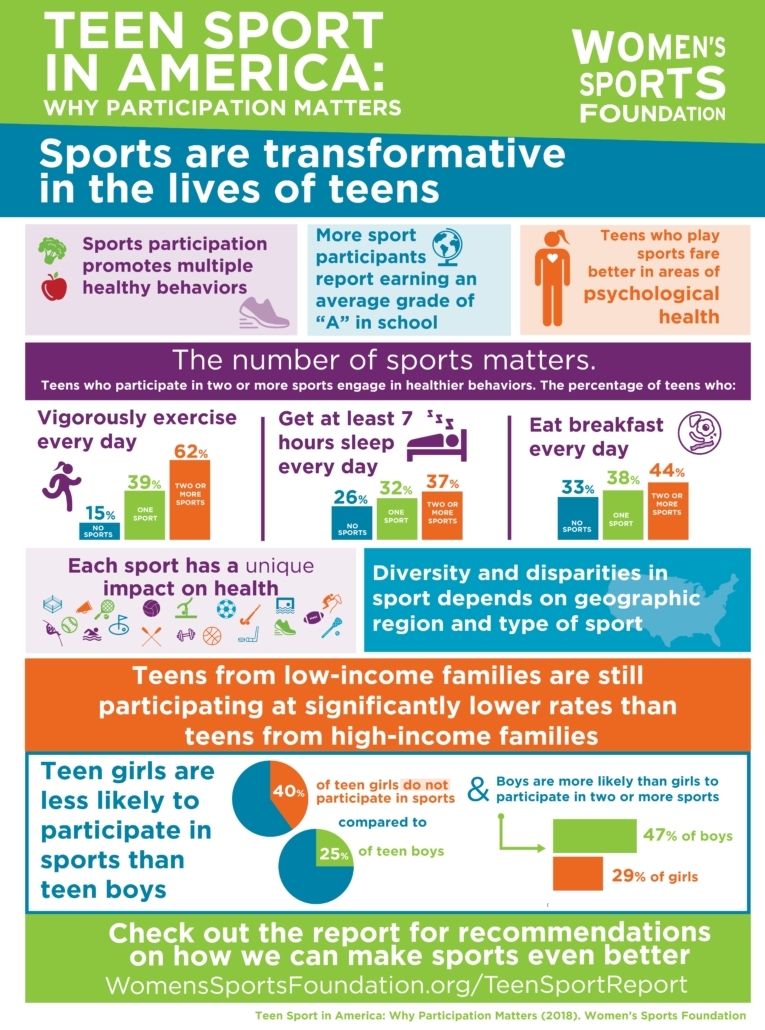
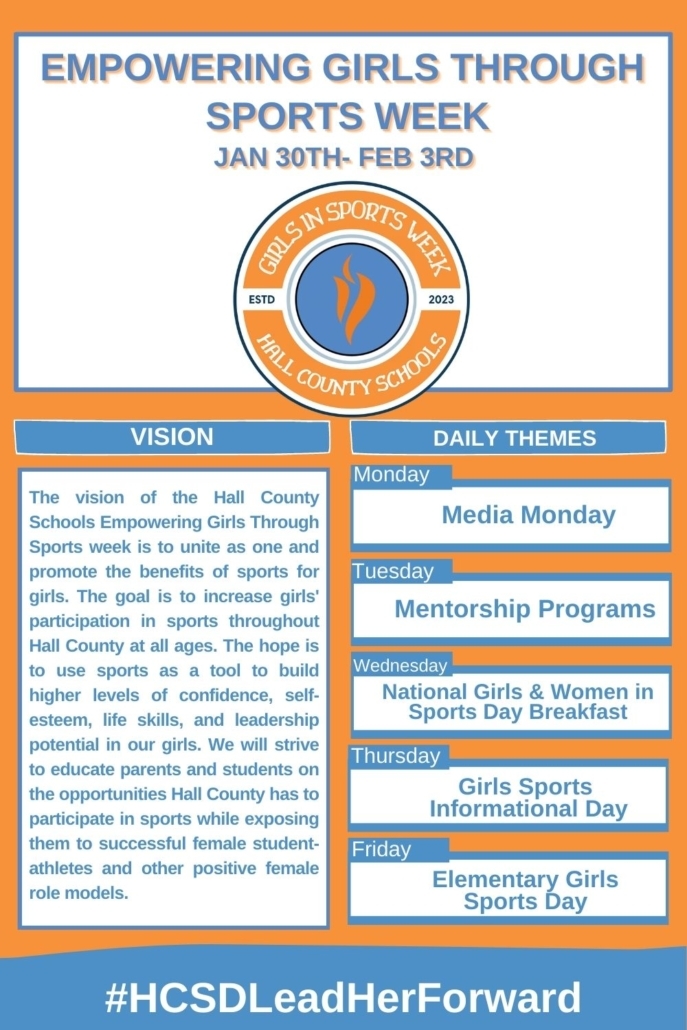
Empowering Girls Through Sports Week

January 31, 2023/in Uncategorized/by Laurie Stowe

https://t.co/BMvYgalP6J

— Branch Athletics (@BranchAthletics) February 1, 2023

As a part of Hall County School Girls Sports Week, we caught up with a few of our middle and high school female student-athletes and asked them what they have learned by playing sports and what inspires them to play. #HCSDLeadHerForward https://t.co/HOvIERYtSW

— Branch Athletics (@BranchAthletics) January 30, 2023

As we continue girls sports week our coaches have put together information on how girls in our community can get involved in sports. #HCSDLeadHerForward. pic.twitter.com/zjylYlqdOV

— Branch Athletics (@BranchAthletics) February 2, 2023

As we continue girls sports week our coaches have put together information on how girls in our community can get involved in sports. #HCSDLeadHerForward. pic.twitter.com/avlrXkf0QK

— Branch Athletics (@BranchAthletics) February 2, 2023

Girls in Sports Highlight Video Day 3
https://fbhs.hallco.org/web/wp-content/uploads/2024/07/FBHS_LogoPNGHeader.png 0 0 Laurie Stowe https://fbhs.hallco.org/web/wp-content/uploads/2024/07/FBHS_LogoPNGHeader.png Laurie Stowe2023-01-31 14:45:222023-02-03 14:11:19Empowering Girls Through Sports Week

GA Safety Bulletin

January 12, 2023/in Uncategorized/by Laurie Stowe
Read more
https://fbhs.hallco.org/web/wp-content/uploads/2024/07/FBHS_LogoPNGHeader.png 0 0 Laurie Stowe https://fbhs.hallco.org/web/wp-content/uploads/2024/07/FBHS_LogoPNGHeader.png Laurie Stowe2023-01-12 12:28:252023-01-12 14:36:45GA Safety Bulletin

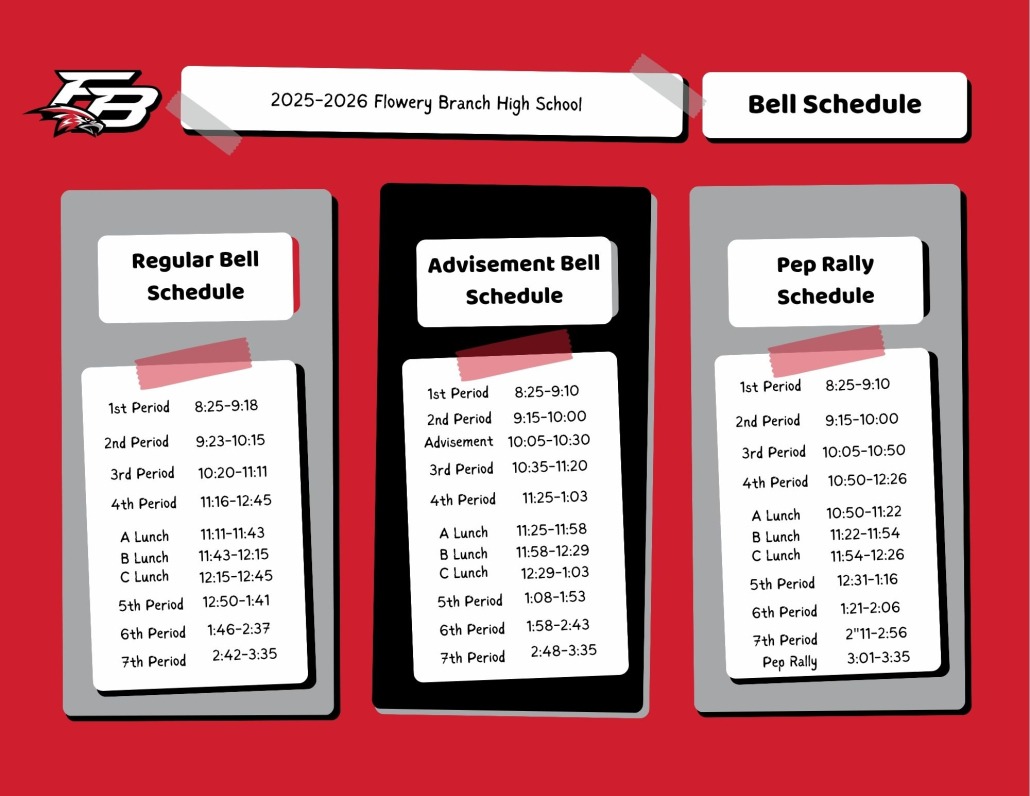
FBHS Bell Schedules 2025-26

August 3, 2021/in Uncategorized/by Laurie Stowe

https://fbhs.hallco.org/web/wp-content/uploads/2024/07/FBHS_LogoPNGHeader.png 0 0 Laurie Stowe https://fbhs.hallco.org/web/wp-content/uploads/2024/07/FBHS_LogoPNGHeader.png Laurie Stowe2021-08-03 18:06:332025-07-10 10:46:51FBHS Bell Schedules 2025-26

Set Up A Parent Portal Account in Infinite Campus for Student Chromebook Permission Form Submission!

August 3, 2021/in Uncategorized/by Laurie Stowe

Click here to log in to Infinite Campus

  • Por favor, desplácese hacia abajo para obtener instrucciones en español.

One of the tools we use to communicate with students and parents is Infinite Campus.  We highly encourage parents to check Infinite Campus frequently so they can stay up to date on schedules, assignments, grades, attendance, messages, and more.


If you have already created an Infinite Campus account (even if you did so when your child was in middle school you can visit https://www.hallco.org/web/ic-portal-users/ and click “Existing IC Users Click Here” then choose “Campus Parent”.  Your login information will remain the same for all your Hall County students until your youngest student graduates High School.  If you have previously created an account but have forgotten your username and/or password, follow the above instructions and then select “Forgot Username” or “Forgot Password,” whichever is applicable.


If you have never created an Infinite Campus account (if your student is brand new to Hall County Schools or if you never created an account previously), please visit https://www.hallco.org/web/ic-portal-users/ and click “New IC Users Click Here” and follow the instructions.  Please create your account on a computer prior to using the mobile app.


Infinite Campus mobile apps can be downloaded through the Apple App Store or Google Play Store.


Navigating the Parent Portal

For multiple children:

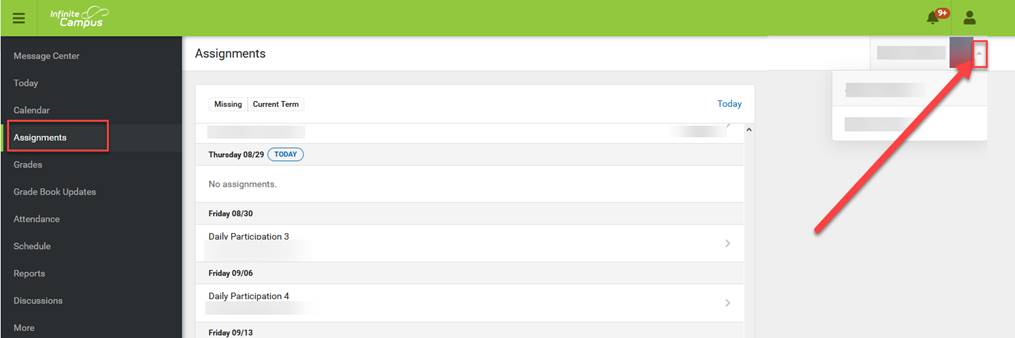
Click on anything other than ‘Today’ on the left-hand side, this will trigger Parent Portal to list all your students. Toggle between your children by clicking on the arrow on the right-hand side of the screen, right under the person, and notification icons. Information will be displayed for the student that is selected.

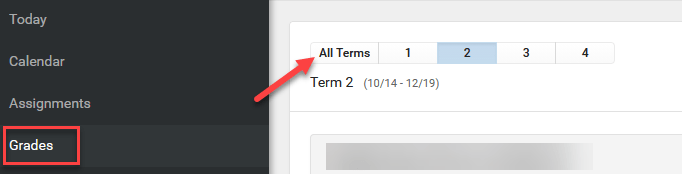
To view grades/averages:

To see the student’s average, depending on their grade level, toggle between the Terms at the top, under the Grades selection on the left:

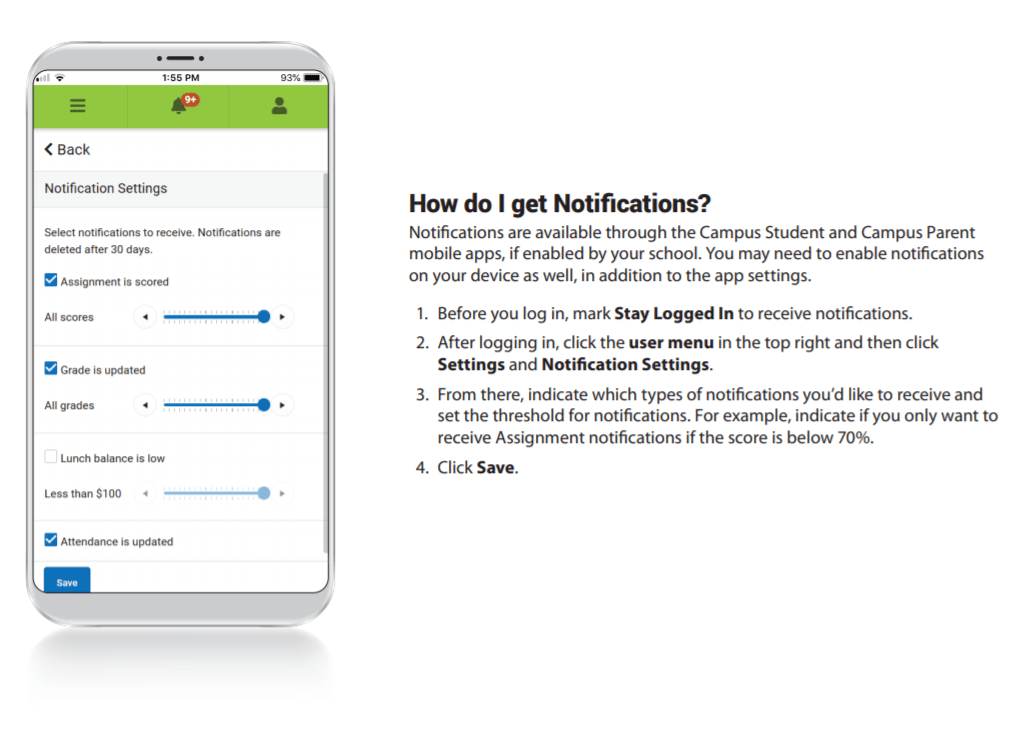
To Get Notifications:

INSTRUCCIONES EN ESPAÑOL

Una de las herramientas que utilizamos para comunicarnos con estudiantes y padres es Infinite Campus. Le recomendamos a los padres que revisen Infinite Campus con frecuencia para que pueda mantenerse al día sobre horarios, tareas, calificaciones, asistencia, mensajes y más.

 Si ya ha creado una cuenta de Infinite Campus (incluso si lo hizo cuando su hijo estaba en la escuela primaria, o si creó una cuenta para un estudiante mayor), puede visitar https://www.hallco.org/web/ic-portal-users/ y hacer clic en “Usuarios Existentes de IC hagan clic aquí” (“Existing IC Users Click Here” ) y luego elija “Campus Parent”. Su información de inicio de sesión seguirá siendo la misma para todos sus estudiantes del Condado de Hall, hasta que su estudiante más joven se gradúe de la Escuela Secundaria. Si ha creado previamente una cuenta pero ha olvidado su nombre de usuario y/o contraseña, siga las instrucciones anteriores y, a continuación, seleccione “Olvidé el nombre de usuario” (“Forgot Username”) o “Olvidé la contraseña” (“Forgot Password”,) lo que sea aplicable.

 Si nunca ha creado una cuenta de Infinite Campus (si su estudiante es nuevo en las Escuelas del Condado de Hall, o si nunca creó una cuenta anteriormente), visite https://www.hallco.org/web/ic-portal-users/ y haga clic en “Nuevos usuarios de IC Haga clic aquí” (“New IC Users Click Here”) y siga las instrucciones. Cree su cuenta en una computadora.

Si tiene alguna pregunta, envíe un correo electrónico a Suzanne Aultman a suzanne.aultman@hallco.org.

Las aplicaciones móviles de Infinite Campus se pueden descargar a través de Apple App Store o Google Play Store.

Navegar por el portal de padres

Para varios niños:

Haga clic en cualquier cosa que no sea “Hoy” en el lado izquierdo, esto hará que El Portal de Padres enumere todos sus estudiantes. Alterna entre sus hijos haciendo clic en la flecha en el lado derecho de la pantalla, justo debajo de la persona y los iconos de notificación. Se mostrará información para el niño seleccionado.

Para ver las calificaciones/promedios:

Para ver el promedio del alumno, dependiendo de su nivel, alterna entre los Términos en la parte superior, en la selección Calificaciones de la izquierda:

https://fbhs.hallco.org/web/wp-content/uploads/2024/07/FBHS_LogoPNGHeader.png 0 0 Laurie Stowe https://fbhs.hallco.org/web/wp-content/uploads/2024/07/FBHS_LogoPNGHeader.png Laurie Stowe2021-08-03 17:16:252021-08-03 17:16:50Set Up A Parent Portal Account in Infinite Campus for Student Chromebook Permission Form Submission!

Graduation Promotion April 28 Deadline!

April 26, 2021/in Uncategorized/by Laurie Stowe
senior_promoflyer
https://fbhs.hallco.org/web/wp-content/uploads/2024/07/FBHS_LogoPNGHeader.png 0 0 Laurie Stowe https://fbhs.hallco.org/web/wp-content/uploads/2024/07/FBHS_LogoPNGHeader.png Laurie Stowe2021-04-26 10:20:322021-04-26 10:23:53Graduation Promotion April 28 Deadline!
Page 2 of 212

Pages

  • Administration
  • Beginning of School Information 2025-26
  • Calendar
  • Calendar
  • Chromebook Care Tips
  • Club Pages
  • Directions to FBHS
  • ESPLOST
  • FBHS History
  • FBHS New-Keep Chromebooks Over The Summer!
  • FBHS Right to Know
  • FBHS Summer School 2025
  • FCA Club
  • FCCLA Club
  • Infinite Campus Parent Portal Instructions
  • MCV4 Vaccine
  • Meal Payment Plus
  • Open House Information
  • Parent/Student Hub
  • Partners Club
  • Partners in Education
  • School Calendar
  • Senior Portraits
  • Start Of School Parent Information
  • STEAM – Why?
  • STEAM Application
  • STEAM Events Info
  • STEAM Home
  • STEAM Mission and Vision
  • STEAM Plan of Study
  • STEAM Senior Capstone
  • The AP Program at FBHS
  • The Branch Summer School Information
  • TOME Society (Reading Club)
  • Welcome

Categories

  • Uncategorized

Archive

  • April 2026
  • August 2025
  • July 2025
  • July 2024
  • July 2023
  • March 2023
  • January 2023
  • August 2021
  • April 2021

Flowery Branch High School

4450 Hog Mountain Rd.
Flowery Branch, GA 30542

Phone: 770-967-8000
Fax: 770-967-1218

School Hours

Monday – Friday
8:00AM – 4:00PM

Additional Links

Legal/Non-Discrimination Notice

GOSA School Report Cards

Complaints

ESPLOST

2026 © Copyright: Flowery Branch High School | Hall County Schools
  • Link to X
Scroll to top Scroll to top Scroll to top