
Set Up A Parent Portal Account in Infinite Campus for Student Chromebook Permission Form Submission!

- Por favor, desplácese hacia abajo para obtener instrucciones en español.
One of the tools we use to communicate with students and parents is Infinite Campus. We highly encourage parents to check Infinite Campus frequently so they can stay up to date on schedules, assignments, grades, attendance, messages, and more.
If you have already created an Infinite Campus account (even if you did so when your child was in middle school you can visit https://www.hallco.org/web/ic-portal-users/ and click “Existing IC Users Click Here” then choose “Campus Parent”. Your login information will remain the same for all your Hall County students until your youngest student graduates High School. If you have previously created an account but have forgotten your username and/or password, follow the above instructions and then select “Forgot Username” or “Forgot Password,” whichever is applicable.
If you have never created an Infinite Campus account (if your student is brand new to Hall County Schools or if you never created an account previously), please visit https://www.hallco.org/web/ic-portal-users/ and click “New IC Users Click Here” and follow the instructions. Please create your account on a computer prior to using the mobile app.
Infinite Campus mobile apps can be downloaded through the Apple App Store or Google Play Store.

Navigating the Parent Portal
For multiple children:
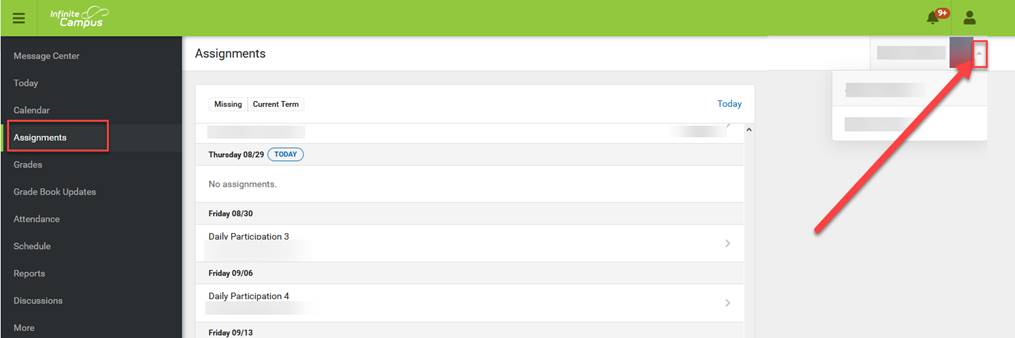
Click on anything other than ‘Today’ on the left-hand side, this will trigger Parent Portal to list all your students. Toggle between your children by clicking on the arrow on the right-hand side of the screen, right under the person, and notification icons. Information will be displayed for the student that is selected.
To view grades/averages:
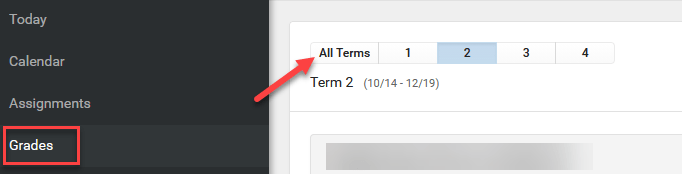
To see the student’s average, depending on their grade level, toggle between the Terms at the top, under the Grades selection on the left:
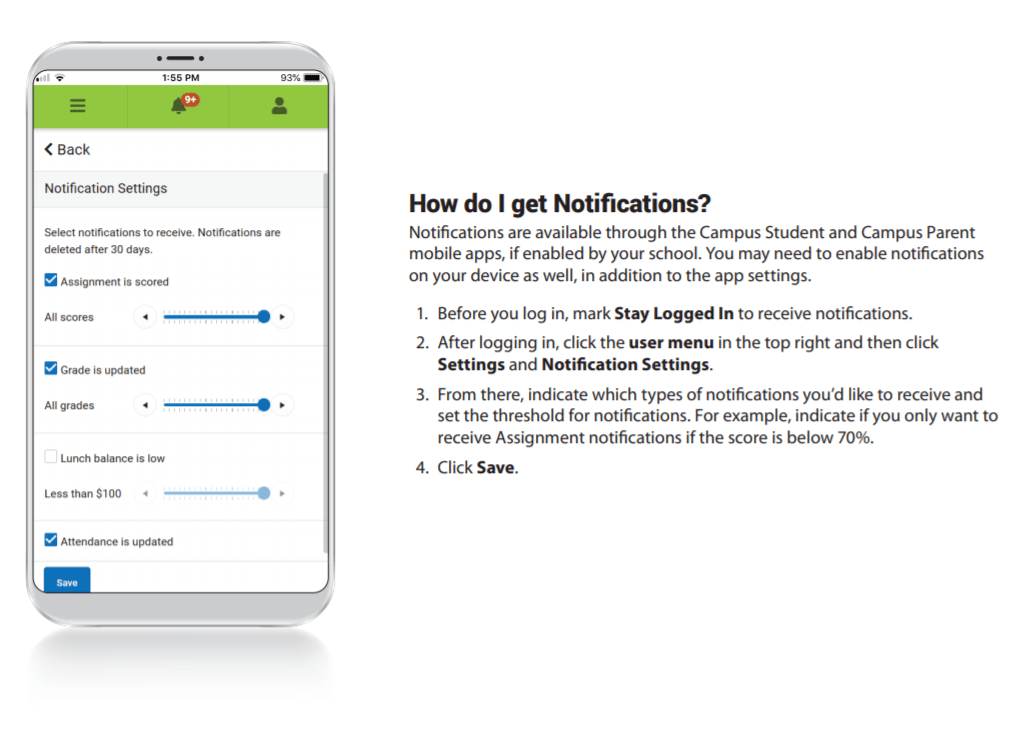
To Get Notifications:
INSTRUCCIONES EN ESPAÑOL
Una de las herramientas que utilizamos para comunicarnos con estudiantes y padres es Infinite Campus. Le recomendamos a los padres que revisen Infinite Campus con frecuencia para que pueda mantenerse al día sobre horarios, tareas, calificaciones, asistencia, mensajes y más.
Si ya ha creado una cuenta de Infinite Campus (incluso si lo hizo cuando su hijo estaba en la escuela primaria, o si creó una cuenta para un estudiante mayor), puede visitar https://www.hallco.org/web/ic-portal-users/ y hacer clic en “Usuarios Existentes de IC hagan clic aquí” (“Existing IC Users Click Here” ) y luego elija “Campus Parent”. Su información de inicio de sesión seguirá siendo la misma para todos sus estudiantes del Condado de Hall, hasta que su estudiante más joven se gradúe de la Escuela Secundaria. Si ha creado previamente una cuenta pero ha olvidado su nombre de usuario y/o contraseña, siga las instrucciones anteriores y, a continuación, seleccione “Olvidé el nombre de usuario” (“Forgot Username”) o “Olvidé la contraseña” (“Forgot Password”,) lo que sea aplicable.
Si nunca ha creado una cuenta de Infinite Campus (si su estudiante es nuevo en las Escuelas del Condado de Hall, o si nunca creó una cuenta anteriormente), visite https://www.hallco.org/web/ic-portal-users/ y haga clic en “Nuevos usuarios de IC Haga clic aquí” (“New IC Users Click Here”) y siga las instrucciones. Cree su cuenta en una computadora.
Si tiene alguna pregunta, envíe un correo electrónico a Suzanne Aultman a suzanne.aultman@hallco.org.
Las aplicaciones móviles de Infinite Campus se pueden descargar a través de Apple App Store o Google Play Store.
Navegar por el portal de padres
Para varios niños:
Haga clic en cualquier cosa que no sea “Hoy” en el lado izquierdo, esto hará que El Portal de Padres enumere todos sus estudiantes. Alterna entre sus hijos haciendo clic en la flecha en el lado derecho de la pantalla, justo debajo de la persona y los iconos de notificación. Se mostrará información para el niño seleccionado.
Para ver las calificaciones/promedios:
Para ver el promedio del alumno, dependiendo de su nivel, alterna entre los Términos en la parte superior, en la selección Calificaciones de la izquierda: